Part 3 – File Formats (text)
Previously: Intro, Running Apple Pascal on a modern Mac, The Editor, The Filesystem.
What kind of system has a “file format” for text?
If you’ve only worked on modern systems, the idea that a “text file” would be anything other than a bunch of unorganized bytes is probably pretty foreign.
But the 1970s were a very different time. So let’s talk about the text file format for the USCD p-System. This is not just something that applies to the text editor, incidentally. If you declare a file as “text” type in Pascal, it gets the same formatting applied. The formatting is transparently stripped from the file if you send it to the PRINTER: or CONSOLE: device.
As far as I was able to determine, this format isn’t fully documented anywhere. The Apple Pascal manual and other reference works that I found treat the header as an implementation detail of the editor, rather than as documented OS functionality.
Text file header
There is a two-block “header” at the start of every text file. Which is…odd, right? A full kilobyte of overhead for every text file? Especially given the space-compression that’s applied in the text blocks (see below), it just seems out of place. And most of it is wasted, anyway…
All of the editor “environment” settings are stored in this header. This includes the indent behavior, margins, the “command” character, and the markers.
Here’s a Rust declaration for the first half of the Text File header:
#[repr(C)]
struct TextFileHeader {
    maybe_version: u16, // I don't know what this is, it seems to always be set to 1?
    marker_count: u16, // Maximum of 10 markers
    marker_labels: [[u8; 8]; 10], // An array of 10 8-character arrays, space-padded
    unknown: [u8; 10], // All zeroes, unused?
    marker_positions:[u16;10], // One file position (character offset) for each marker
    auto_indent: u16, // auto-indent enabled
    fill: u16, // Fill enabled
    token: u16, // token search on/off
    left_margin: u16, // left margin
    right_margin: u16, // right margin
    para_margin: u16, // paragraph margin
    command_char: u16, // command character
    date_created: u16, // date created
    date_last_used: u16, // date last used
    filler: [u8; 380] // reserved, all zeroes
}
The second 512-bytes of the header is all zeroes. For details on the date format used, see the Filesystem post.
Text file blocks
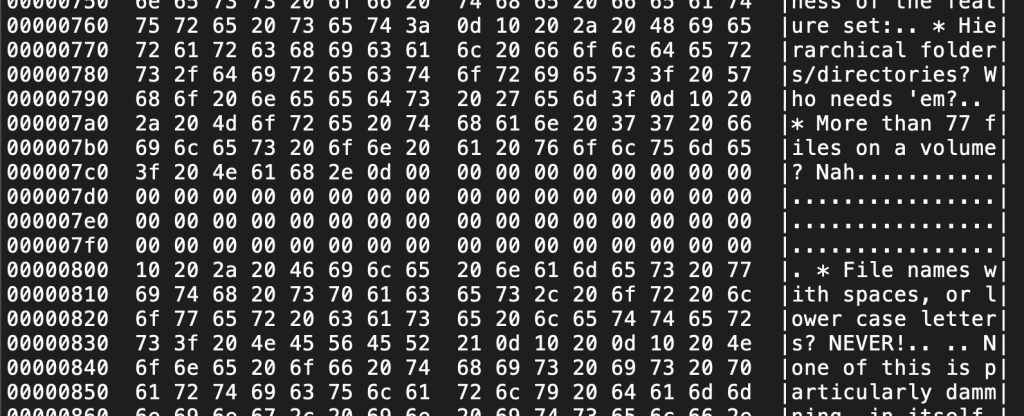
Text is stored in blocks of 1024 bytes. Lines are terminated with the ASCII CR (0x0d) character, and lines cannot cross a text block boundary. When a line will not fit in the remaining space in a block, the end of the block (after the last CR) is filled with NUL bytes. If you create a completely-empty text file, it takes up 4 disk blocks, two for the header, and two for the first (empty) text block.
Initial space compression
When a line in a text file starts with repeated space characters, the initial spaces may be stored as a run length. This appears as an ASCII DLE (0x10) character followed by a single character, interpreted as (32 + space count). For example, for a non-indented line, you would expect to see 0x10 0x20, or DLE followed by a Space character, at the beginning of the line. I suspect this rather-odd encoding was done so you could “forget” to fix the formatting in a dump to a printer, and it’d still come out okay, given an invisible, generally harmless control character, followed by an ASCII symbol.
There is no documentation on when this is/isn’t done, but in a test, it didn’t seem to happen for < 12 consecutive spaces, when just typing in text. If you use the Adjust feature in the editor, it does go back and compress every line that’s changed. I suspect the Margin tool would, as well.
Text files written from a Pascal program don’t get this treatment. Any spaces in text you write is preserved. But again, this is transparent from the Pascal program’s perspective. You just read and write lines, and the formatting is taken care of by the system.
Converting “UCSD text” to a “normal” text file
This is pretty straightforward, if you want to maintain the strict 80-column hard-wrapped format that the Editor enforces. All you have to do is skip the initial 2-block header, convert the CLE+count character sequences to spaces, and replace the CR line endings with your preferred line ending characters. Oh, and drop all of those embedded NUL bytes that appear in the middle of the text.
I’ve implemented that in my p-filer code, so I can now transfer text from my Apple Pascal disk images to a native MacOS text file. If I get ambitious, maybe I’ll implement a mode where it tries to combine wrapped lines that occur within a paragraph.
What’s next?
Now that I can transfer files to and from the Apple Pascal system, the next step is to build some code with the compiler, and analyze it. Luckily, the Apple Pascal Operating System Reference manual has a lot of detail about the object file format, so I shouldn’t have to reverse-engineer much of it.
 markbessey.blog
Leave a comment