Related: UCSD p-System Info
As part of my explorations of the UCSD p-System, the first thing I wanted to do was to get Apple Pascal for the Apple II running on my current Mac.
There are about a million ways to skin this particular cat, but here’s what I did, to get going quickly:
Get yourself an emulator
I used Virtual ][, and yes I did pay the licensing fee. I actually started out on installing MAME (which can also emulate an Apple II), then decided that was really not the goal here, and a simpler install process and a nice Apple-specific UI for tweaking the emulator was probably a better fit for me.
Download the Apple Pascal Disk images
I got these from Apple2.org.za, here
You want these files (probably):
| Apple II Pascal 1.3 APPLE0: 680-0282-A.dsk |
| Apple II Pascal 1.3 APPLE1: 680-0283-A.dsk |
| Apple II Pascal 1.3 APPLE2: 680-0284-A.dsk |
| Apple II Pascal 1.3 APPLE3: 680-0290-A.dsk |
Insert Apple1 into the first virtual drive, and Apple2 into the second drive. Apple0 is a special boot disk for single-drive systems, which you probably don’t need unless you’re a true masochist and want to experience the pain of swapping disks every time you do anything in the IDE.
Start it up
Boot the emulator, and you should see the UCSD p-System start up, in all its glory!
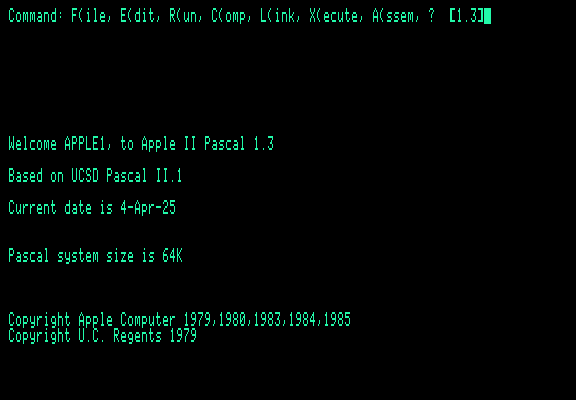
Next up: The Editor
 markbessey.blog
Leave a comment